External Dependencies»
This document provides a comprehensive overview of all external components necessary to operate Spacelift. It is useful for those planning to deploy a self-hosted version of Spacelift and seeking to ensure their infrastructure is appropriately prepared.
The configuration of these components is flexible. For instance, you may opt to use Google Object Storage alongside AWS SQS for queuing.
This modular approach allows you to tailor the setup to suit your specific needs, giving you the freedom to design and deploy Spacelift in a manner that aligns with your infrastructure preferences.
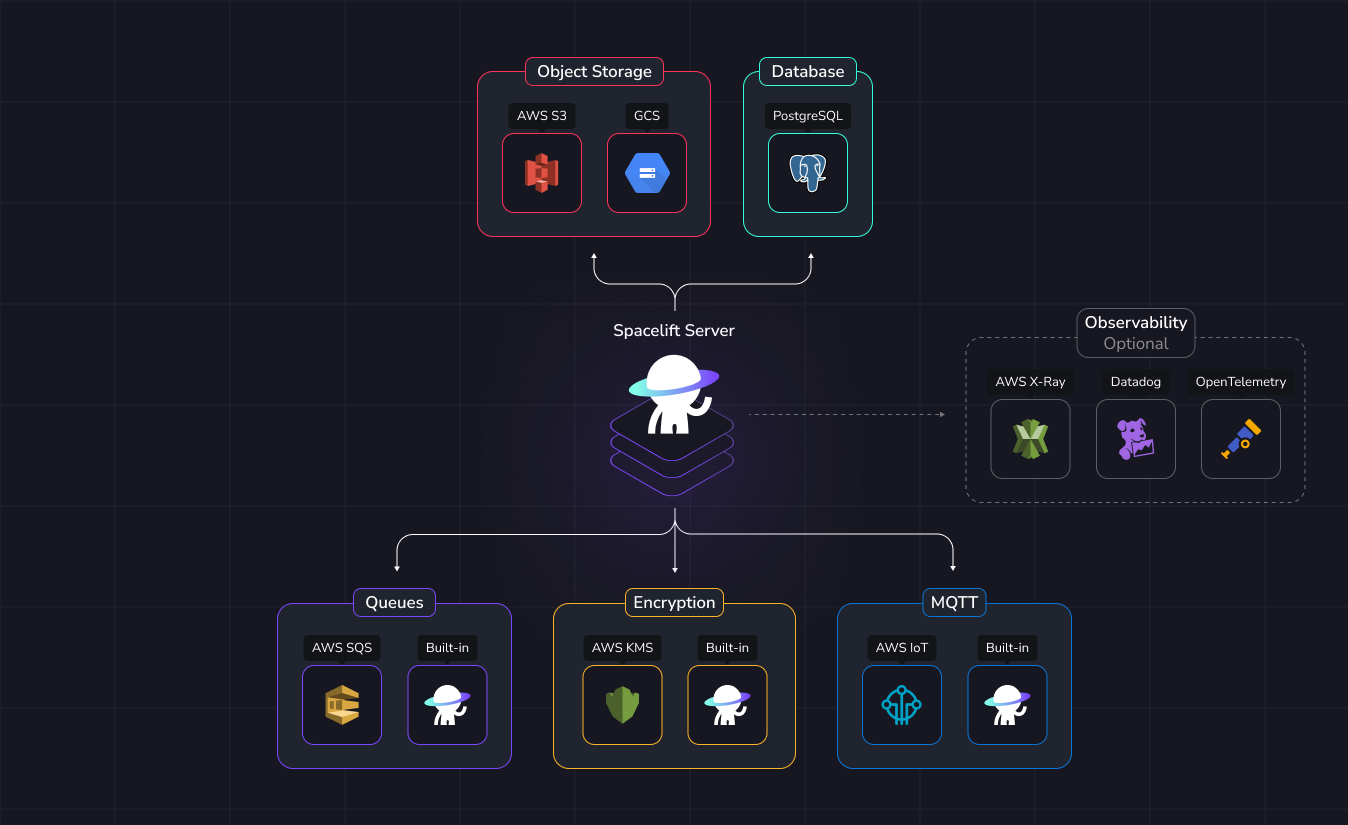
For convenience, we provide implementations of certain requirements built into Spacelift, allowing you to avoid reliance on separate external services.
Therefore, using an external service for the following components is optional:
- Message queues.
- Encryption.
- MQTT Broker.
On the other hand, the components below are mandatory and must be provided:
- PostgreSQL database.
- Object storage backend.
Database»
Spacelift only supports PostgreSQL.
Warning
Creating a database in Kubernetes, while possible, is not recommended. If you choose to do so, set up a volume for continuity of operations in the event of a power outage.
Spacelift officially supports PostgreSQL versions 14 through 18. Newer major versions may work, but they have not been officially tested or supported.
As such, we cannot guarantee compatibility or provide assistance for any issues that may arise. We recommend using these versions at your own discretion and risk.
The recommended approach is to use the database service provided by your cloud provider for running PostgreSQL.
However, if necessary, you may choose to manage and operate your own PostgreSQL instance independently. There are no obligations to use a cloud provider’s service.
If you already have an existing PostgreSQL instance running, you can reuse it. Spacelift simply requires a dedicated database with full administrative permissions.
| Supported | |
|---|---|
| PostgreSQL ≤ 13 | ❌ |
| PostgreSQL 14.x | ✅ |
| PostgreSQL 15.x | ✅ |
| PostgreSQL 16.x | ✅ |
| PostgreSQL 17.x | ✅ |
| PostgreSQL 18.x | ✅ |
| PostgreSQL ≥ 19 | ⚠️ not officially supported |
Upgrading PostgreSQL»
PostgreSQL uses a major.minor versioning scheme. Minor upgrades (e.g., 16.1 → 16.4) contain bug fixes and security patches without changing the internal storage format, making them low-risk and quick to apply. Major upgrades (e.g., 16 → 17) introduce new features and improvements but require data migration due to internal storage format changes, which is why they take longer and require more planning.
We recommend staying current with minor versions for security and stability. For major upgrades, plan ahead and review the considerations below before proceeding.
Minor upgrades across all cloud providers come with no downtime or at most a few seconds of interruption. Major upgrades typically require 15-30 minutes of downtime. All Spacelift services are designed to self-heal once the database is back online, so you don't need scale down, up, redeploy or restart any Spacelift components during the upgrade.
During a major upgrade:
- The Spacelift UI will be unavailable and return internal errors.
- Spacelift won't receive webhooks from your VCS provider - any pushes or pull request events during this window will be missed. Schedule major upgrades outside of working hours when traffic is low.
- Cloud providers typically create a database snapshot before starting the upgrade, but verify this in your provider's documentation.
- Scale worker replica counts to 0 before initiating the upgrade. This is a graceful operation: in-flight runs will complete first, then workers will shut down. Wait until all workers are down before starting the database upgrade to prevent runs from failing to report run results back to the unavailable Spacelift API.
Minor upgrades can use Zero-Downtime Patching on Aurora PostgreSQL, resulting in zero downtime or at most a few failed queries. Major upgrades require 12-30 minutes of downtime depending on instance size and data volume.
For near-zero downtime, Blue/Green Deployments allow you to upgrade a staging copy first, then switch over in under a minute - though this approach requires more setup and coordination.
For step-by-step instructions using our Terraform modules, see the RDS Upgrade Guide. For general Aurora/RDS upgrades, see the AWS documentation.
Minor upgrades are applied automatically during maintenance windows or can be triggered manually with minimal downtime. Major upgrades require downtime, typically completing in 15-30 minutes depending on database size. Running a precheck operation before upgrading is recommended.
See Upgrade PostgreSQL in-place in the Cloud SQL documentation.
Minor upgrades are handled automatically by Azure. Major upgrades are performed in-place and typically complete in around 20 minutes, though duration depends on database size. Read replicas must be deleted before upgrading.
See Major version upgrade in the Azure Database for PostgreSQL documentation.
Object storage backend»
An object storage backend is essential for Spacelift to store various files, including run logs, Terraform state files, and other necessary data.
This storage ensures the proper management and persistence of critical information needed for the operation of Spacelift.
| Supported | |
|---|---|
| AWS S3 | ✅ |
| Google Cloud Storage | ✅ |
| Azure Blob Storage | ✅ |
| MinIO | ✅ |
Encryption»
Danger
Once an encryption method is selected, transitioning to an alternative method will not be possible, as it would require the migration of all encrypted database entries, which is not supported. Therefore, it is essential to make a well-informed decision when selecting the encryption method.
Spacelift employs encryption to protect sensitive data stored in the database, ensuring that such information is not stored in plaintext.
When using the built-in encryption mechanism, a private RSA key is required, which must be passed to the Spacelift backend via an environment variable. This approach introduces a potential risk, as the secret could be accessed if not properly secured. It is important to carefully consider how this secret will be managed and protected within your infrastructure.
Spacelift also requires the use of an asymmetric key pair for performing the signing and verification of JWT (JSON Web Tokens).
The asymmetric key pair consists of a private key, which is used to sign the token, and a corresponding public key, which is used to verify its authenticity. This process ensures that the integrity of the tokens is maintained, and that they can be trusted by the recipient, as the signature is uniquely tied to the private key and cannot be altered without detection.
| Supported | |
|---|---|
| AWS KMS | ✅ |
| Built-in RSA + AES256 | ✅ |
Message queues»
Spacelift uses message queues to dispatch events for asynchronous processing. We support two types of message queue: AWS SQS, or a built-in message queue that uses the Postgres database. We recommend using the built-in message queue for any new installations, but SQS support is provided for backwards-compatibility with existing installations.
| Supported | |
|---|---|
| AWS SQS | ✅ |
| Built-in | ✅ |
MQTT broker»
An MQTT broker is required for communication with workers only when workers use the MQTT transport. Workers can instead use the HTTP long-poll transport, which requires no MQTT broker.
Spacelift can run its own MQTT broker embedded with the Spacelift Server.
Info
If you want to use IoT Core as the MQTT broker, you must use AWS SQS for message queues.
| Supported | |
|---|---|
| AWS IoT Core | ✅ |
| Built-in | ✅ |
Observability»
Logging»
Spacelift components will output logs in JSON to the standard output (/dev/stdout).
Since log collection is dependent on the observability system you use and the infrastructure you deploy Spacelift to, it is out of scope for this document.
Telemetry»
Spacelift also support tracing for in depth debugging. That is fully optional and can be disabled.
| Vendor | Supported |
|---|---|
| Datadog | ✅ |
| AWS X-Ray | ✅ |
| OpenTelemetry | ✅ |