OpenTofu»
Why use OpenTofu?»
OpenTofu is an open-source infrastructure-as-code tool, forked from Terraform. It is community-driven and licensed under the Mozilla Public License (MPL 2.0). OpenTofu maintains compatibility with Terraform's HCL configuration language, providers, and modules, while introducing its own features such as state encryption, concise output, CPU profiling, and resource identities.
Why use Spacelift with OpenTofu?»
Spacelift provides native, first-class support for OpenTofu as a dedicated vendor. This means OpenTofu stacks have their own configuration, settings, and features, separate from Terraform stacks.
Spacelift helps you manage the complexities and compliance challenges of using OpenTofu. It brings with it a GitOps flow, so your infrastructure repository is synced with your OpenTofu stacks, and pull requests show you a preview of what they're planning to change. It also has an extensive selection of policies, which let you automate compliance checks.
You can also use stack dependencies to build complex multi-stack workflows. Mix and match OpenTofu, Terraform, Pulumi, and CloudFormation stacks, and pass outputs from one stack to another as inputs. Use contexts to share configuration between stacks.
Stacks only
The OpenTofu vendor is available for stacks. Modules and Terragrunt stacks keep using OpenTofu through their existing workflow tool setting (OPEN_TOFU). See Modules and Terragrunt.
Creating an OpenTofu stack»
When creating a stack, select OpenTofu as the vendor.
The following configuration options are available:
Workflow tool»
Choose between two options:
- OpenTofu — out-of-the-box support for OpenTofu. Select the version you want and you are good to go.
- Custom — allows you to customize the commands that are executed as part of the workflow. See the custom workflow tool documentation for details. Concise output, CPU profiling and structured
-json-intologs are not applied with a custom workflow.
Version»
Set the OpenTofu version to use. You can specify an exact version (e.g. 1.8.0) or a version constraint (e.g. >= 1.8.0, ~> 1.10). When using a constraint, Spacelift selects the highest matching version for each run. The version is required: an empty value or latest is rejected.
OpenTofu binaries are dynamically downloaded and verified for each run. Spacelift supports all stable OpenTofu versions. The version can also be overridden per-run using the opentofu runtime configuration block.
Version constraints are validated against the lowest version they admit
Some settings need a minimum OpenTofu version (see the feature support table). When you save a constraint, Spacelift checks it against the earliest version the constraint admits, not the version that would be selected for the next run. While concise output is on, a constraint that admits anything older than 1.7.0 (for example ~> 1.6 or >= 1.0) is rejected until you either tighten the constraint (for example >= 1.7.0) or turn concise output off.
Warning
The newest OpenTofu version supported by Spacelift may lag slightly behind the latest available release. Spacelift separately verifies each version to ensure compatibility.
Smart Sanitization»
When enabled, Spacelift sanitizes the outputs of OpenTofu state and plans using OpenTofu's sensitive value system, only hiding values explicitly marked as sensitive. This is recommended for most stacks. See Resource sanitization for details.
Concise output»
When enabled, Spacelift passes the -concise flag to tofu plan, tofu apply and tofu destroy. This produces cleaner logs, especially for stacks with many resources. Concise output is enabled by default on new OpenTofu stacks on version 1.7 or newer, and disabled by default on older versions. It only applies with the built-in OpenTofu workflow tool.
Concise output removes these lines from the run logs:
- Plan: the "Refreshing state..." progress lines.
- Apply and destroy: every per-resource progress line, such as "Creating...", "Still creating...", "Creation complete" and "Destroying...". Provisioner output is also removed.
Errors and the "Apply complete!" or "Destroy complete!" summary still appear.
Tip
To see per-resource progress, for example to debug an apply that failed part-way, disable concise output. The change applies to new runs only. Logs of finished runs do not change.
Info
Requires OpenTofu 1.7+ for plan and 1.10+ for apply and destroy. Below those versions the flag is omitted for that command and the run proceeds with regular output. Version constraints that admit versions older than 1.7.0 are rejected while this setting is on (see Version).
CPU profiling»
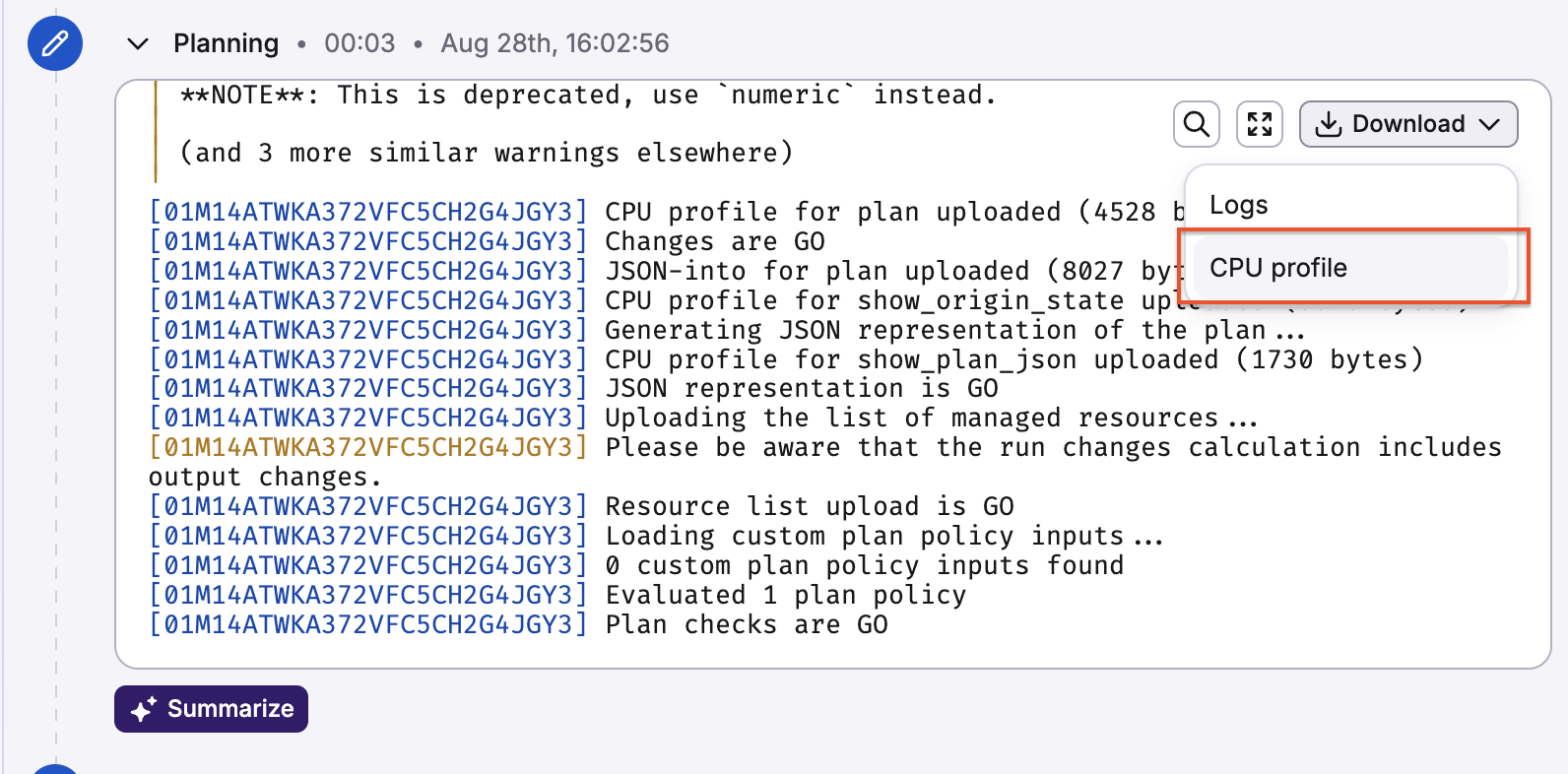
When enabled, Spacelift captures one CPU profile (pprof) per run state: initializing, planning, applying and destroying. Each profile merges every OpenTofu command that runs in that state, and the spacelift.command sample label tells the commands apart. These profiles can help diagnose performance issues in your infrastructure runs. CPU profiling is enabled by default on new OpenTofu stacks on version 1.11 or newer, and disabled by default on older versions. It only applies with the built-in OpenTofu workflow tool.
Spacelift enables profiling by setting the TOFU_CPU_PROFILE environment variable on the OpenTofu process and uploading the resulting profile after each command completes. Collection is best-effort: if the profile cannot be written or uploaded, the run is unaffected.
Once a profile is available, download it from the Download menu of the corresponding run state in the run view, or through the API (see Downloading CPU profiles).
Info
Requires OpenTofu 1.11+, the first release that honors TOFU_CPU_PROFILE. On older versions the setting is silently skipped.
Downloading CPU profiles»
CPU profiles can be downloaded per run state from the run view, or through the GraphQL API:
1 2 3 4 5 6 7 8 9 10 | |
Open the downloaded file with go tool pprof or any pprof-compatible viewer.
Who can download logs and CPU profiles
Any user or API key with read access to the stack's space can download its run logs and CPU profiles. The Space reader role is enough. This applies to the run view and to the logsDownloadURL and cpuProfileDownloadURL API fields.
State management»
Spacelift offers an optional state backend for OpenTofu stacks. When enabled, Spacelift manages the OpenTofu state for you, synchronized with the rest of the application for maximum security and convenience.
Warning
State management can only be enabled during stack creation. It cannot be toggled after the stack is created.
For more details, see State management.
When state management is enabled, you can also configure:
- External state access — allows other stacks or external consumers to read this stack's state. See External state access for details.
- Import existing state file — upload an existing state file during stack creation to avoid having to import individual resources later.
When state management is disabled, you can specify a workspace to select when running OpenTofu commands.
Feature support by OpenTofu version»
Spacelift enables the following OpenTofu features only when the version resolved for the run meets the minimum. Older versions still run, they just don't get the feature. Spacelift natively supports concise output, CPU profiling and -json-into logs only with the built-in OpenTofu workflow tool.
| Feature | Minimum OpenTofu version |
|---|---|
Concise output for plan |
1.7 |
| State encryption | 1.7 |
Concise output for apply and destroy |
1.10 |
CPU profiling (TOFU_CPU_PROFILE) |
1.11 |
| Ephemeral resources and values | 1.11 |
Structured JSON logs captured with -json-into |
1.12 |
Runner image»
Unless you set a custom runner image, OpenTofu stacks run on public.ecr.aws/spacelift/runner-opentofu:latest.
The tofu binary is not baked into that image. Spacelift downloads and verifies the version selected for the run and mounts it into the container, exactly as it does for Terraform. If you build your own image on top of runner-opentofu, keep relying on the mounted binary. Do not enable the option to skip vendor binary downloads unless your image ships its own tofu, otherwise the run fails with Binary "tofu" not found in PATH. This option is available only through the GraphQL API, as the skipVendorBinaryDownload field of StackInput.
Version management»
OpenTofu versions in Spacelift work similarly to Terraform versions. Spacelift dynamically detects the right version for each workflow, downloads the binary on demand, verifies it, and mounts it on the runner container.
There are two ways to specify which OpenTofu version to use:
- Stack settings — set the version in the Vendor section of the stack configuration. You can specify an exact version or a version constraint.
- Runtime configuration — override the version per-run via the
opentofublock in.spacelift/config.yml.
Use the opentofu block in .spacelift/config.yml
On native OpenTofu stacks the legacy terraform_version and opentofu_version runtime configuration keys are not read. If either key applies to the stack, directly or through stack_defaults, without an opentofu block at the same or a higher level, every run fails during preparation with an error saying the configuration still sets terraform_version. This is easy to hit in monorepos that mix Terraform and OpenTofu stacks and pin terraform_version in stack_defaults: move the pin under the individual Terraform stacks, or add an opentofu block for the OpenTofu stacks. Only version and workflow_tool can be overridden this way. See the runtime configuration reference for details.
Policies»
OpenTofu stacks work with every policy type. What OpenTofu stacks send to policies:
- Plan policies receive the plan under
input.opentofu(resource_changes,checks,opentofu_version) and mirrored underinput.terraform, so existing Terraform plan policies keep working unchanged. - In approval, notification, push, task and trigger policies,
input.stack.terraform_version,input.stack.terraform_workflow_toolandinput.run.runtime_config.terraform_versionarenullfor OpenTofu stacks, and there is novendorfield on the stack or run documents yet. If you need to tell OpenTofu stacks apart in these policies, use a label for now. - Initialization policies do see the vendor:
input.static_run_environment.vendor_specific_config.vendoris"opentofu". - Change documents (for example in approval, notification, push and trigger policies) report
entity_vendoras"opentofu"for native OpenTofu stacks. Legacy Terraform stacks using the OpenTofu workflow tool keep"terraform".
Modules and Terragrunt»
The OpenTofu vendor applies to stacks only:
- Modules in the module registry keep using the Terraform vendor. To test a module with OpenTofu, set its workflow tool to
OPEN_TOFU. - Terragrunt stacks select OpenTofu through their
toolsetting (OPEN_TOFU), which is also the default for new Terragrunt stacks.
.tofu file support»
OpenTofu 1.8+ supports .tofu files as OpenTofu-specific overrides of .tf files. If both main.tf and main.tofu exist, the .tofu version takes precedence. This lets you maintain a dual Terraform/OpenTofu codebase while using .tofu files for OpenTofu-specific configuration.
Spacelift fully supports .tofu files in OpenTofu stacks. Push policies correctly detect changes to .tofu files.
Shared documentation»
OpenTofu stacks share many concepts and features with Terraform stacks. The following documentation applies equally to OpenTofu stacks:
- State management
- External state access
- External modules
- Handling .tfvars
- CLI configuration
- Resource sanitization
- Storing complex variables
- Dependency lock file
- Custom workflow tool
- Debugging guide
Migrating from legacy Terraform stacks»
If you have existing Terraform stacks using the OpenTofu workflow tool (workflow_tool=OPEN_TOFU), you should migrate them to native OpenTofu vendor stacks. See the migration guide for details.