Migrating to native OpenTofu stacks»
If you have existing Terraform stacks that use the OpenTofu workflow tool (workflow_tool=OPEN_TOFU), you should migrate them to native OpenTofu vendor stacks. Native OpenTofu stacks provide a cleaner configuration model and access to OpenTofu-specific features like concise output and CPU profiling.
Info
Migration does not affect your infrastructure or state. It only changes how the stack is configured in Spacelift. Your runs, state files, and cloud resources remain untouched.
Before you migrate»
Migration changes the stack's vendor. Anything that manages the stack through the API, including the Spacelift Terraform provider, older spacectl releases and your own scripts, must understand the OpenTofu vendor before you migrate, otherwise their next update to the stack fails.
-
Upgrade the Spacelift Terraform provider to v1.53.5 or later. This is the first release where
spacelift_stacksupports theopentofublock. Older providers omit the vendor configuration on update, which Spacelift rejects with:1the stack vendor cannot be changed after the stack is created, but you are trying to update it from OpenTofu to Terraform -
Upgrade
spacectlto v1.26.0 or later for the same reason. - Update CI pipelines and scripts that call the
stackUpdateGraphQL mutation so they sendvendorConfig.opentofufor migrated stacks.
Do the provider and pipeline upgrades first, then migrate stacks, then update the spacelift_stack resources as described in Updating the Spacelift Terraform Provider configuration.
What gets migrated»
During migration, Spacelift converts the stack from vendor=Terraform with workflow_tool=OPEN_TOFU to vendor=OpenTofu. The following settings are carried over:
- Version — the migration copies the OpenTofu version or constraint as is. The version controls the defaults of concise output and CPU profiling below. See Version.
- Workspace — the workspace setting (if any).
- Smart Sanitization — the
use_smart_sanitizationsetting. - External state access — the
external_state_access_enabledsetting.
OpenTofu-specific settings are set to:
- Concise output — enabled on OpenTofu 1.7+, disabled on older versions. Turn it off after migration if you rely on the "Refreshing state..." output or on per-resource apply and destroy progress. See Concise output.
- CPU profiling — enabled on OpenTofu 1.11+, disabled on older versions.
These are the same defaults as for new OpenTofu stacks. For a version constraint, Spacelift checks the earliest version that the constraint admits. For example, >= 1.0 gets both settings disabled.
Prerequisites»
- You need the Space Writer or Space Admin role on the space of every stack you want to migrate.
- Machine users cannot migrate or roll back stacks. Spacelift rejects sessions from an API key that is marked as a machine user.
- Stacks with a run in progress are skipped and picked up again automatically once the run finishes.
- The OpenTofu vendor is available for stacks only. Modules and Terragrunt stacks keep using the OpenTofu workflow tool and are not affected by this migration. Stacks labelled
terragruntare excluded as well: migrate those to native Terragrunt stacks instead. - If your stacks are created from a blueprint, update the blueprint to use the
opentofuvendor block so that new stacks are created natively.
Migrating stacks in bulk»
The recommended way to migrate is in bulk. On the Dashboard, the Migrate stacks to native vendors widget shows the stacks that can move to a native vendor. Its OpenTofu tab lists the stacks that are ready to migrate and the stacks in the migration queue.
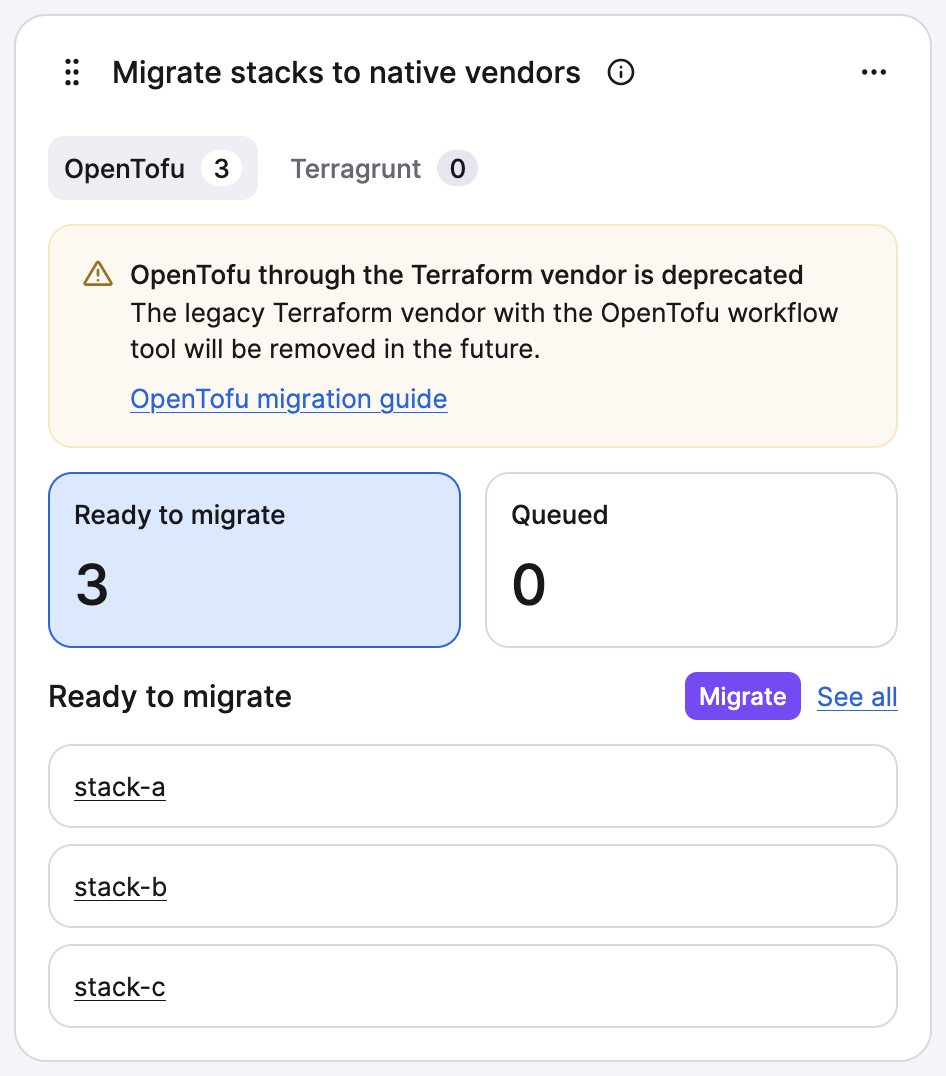
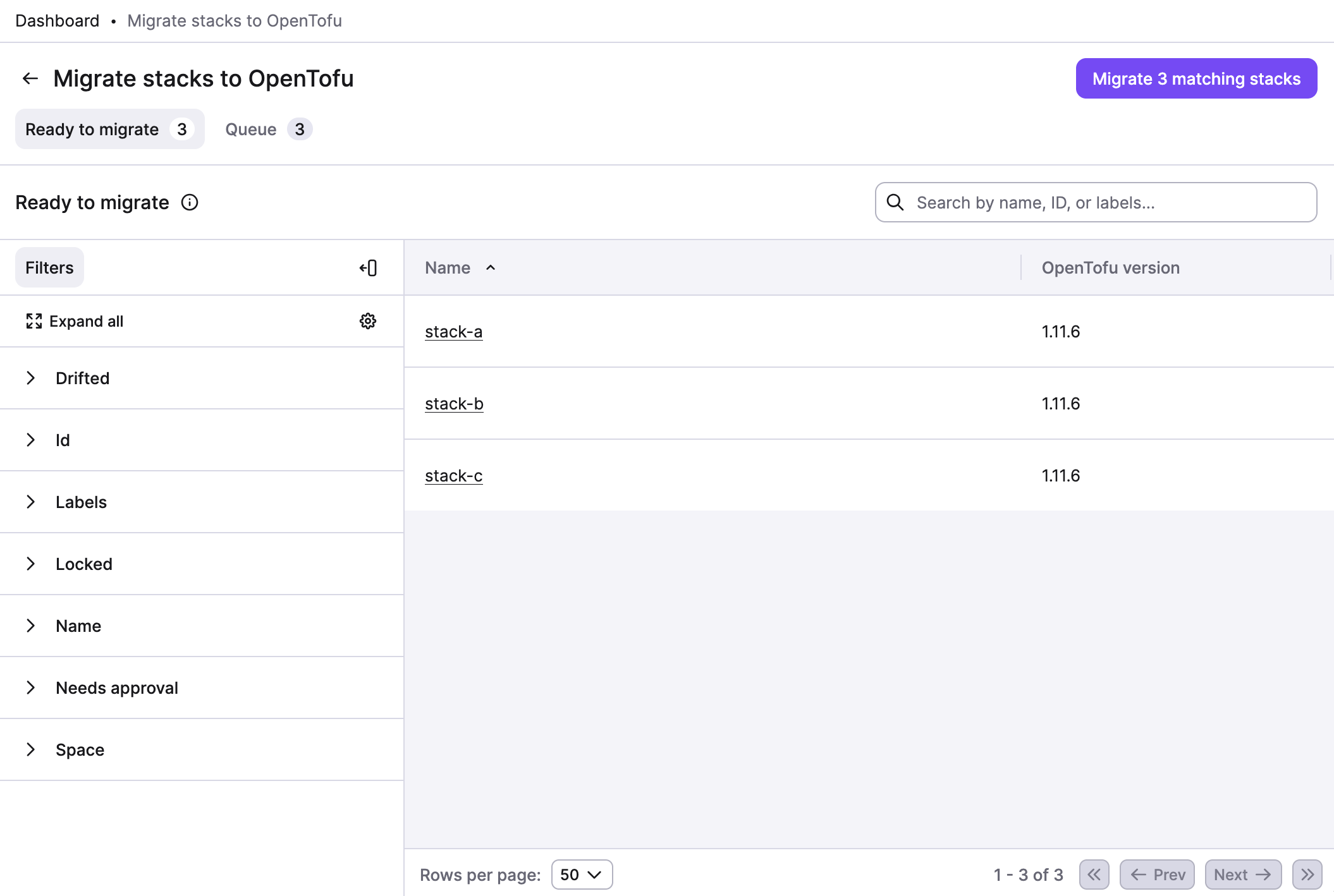
Click Migrate in the widget to open the Migrate stacks to OpenTofu page. On this page you can:
- Filter stacks — use stack filters to include or exclude stacks by space, labels, or other criteria.
- Preview — see the stacks that match the filters before you migrate them.
- Migrate — click Migrate N matching stacks to add the matching stacks to the migration queue.
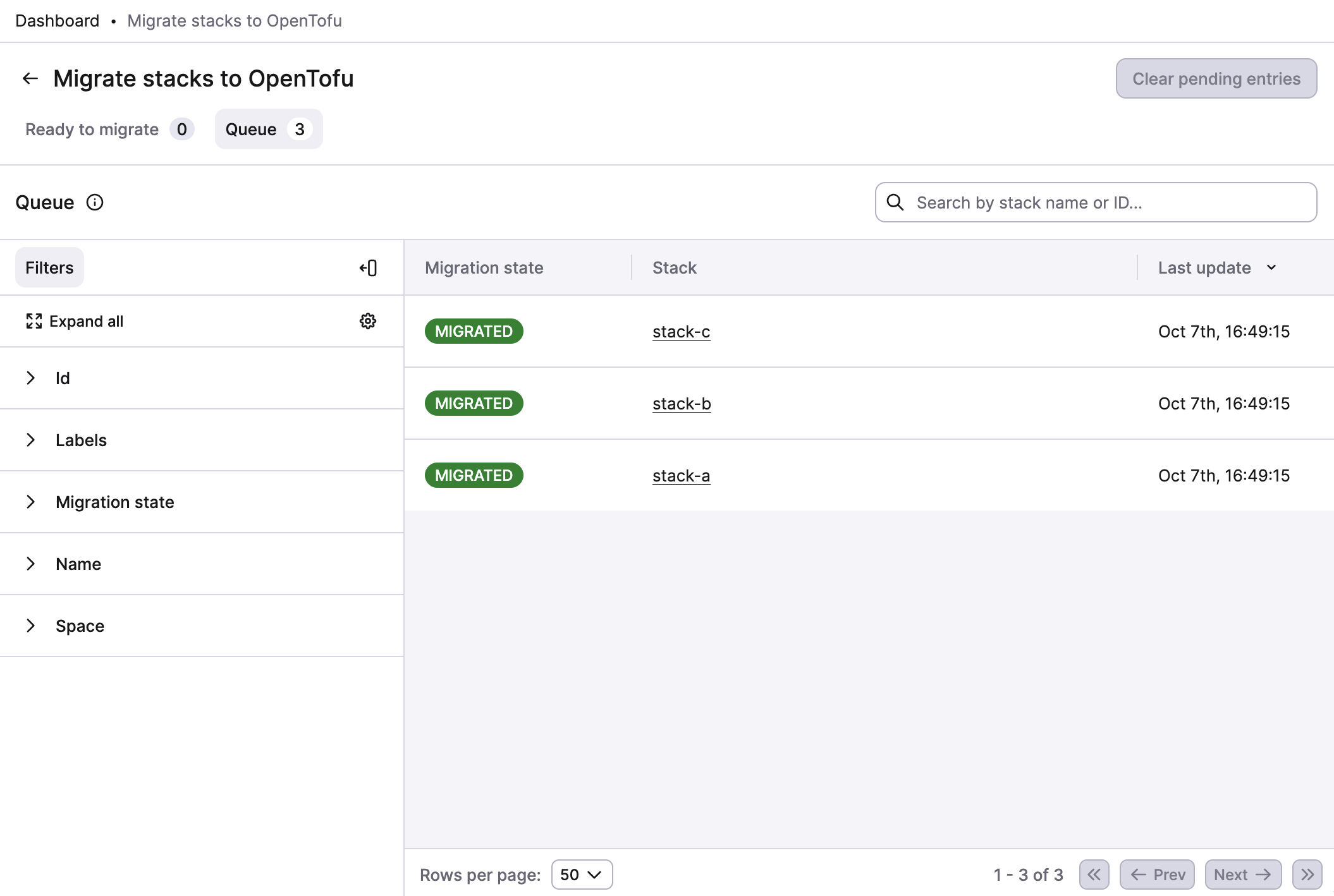
Migration is asynchronous. Stacks are processed one by one in the background. The Queue page shows every stack that was queued for migration or rollback, with its state: Queued, Migrated, Rollback queued, Rolled back or Failed. Click Clear pending entries to remove the stacks that are still waiting.
Through the API, the openTofuMigrate mutation additionally accepts triggerRun: true to start a tracked run on each stack right after it migrates, which is a convenient way to validate the new vendor against your existing configuration.
Migrating a single stack»
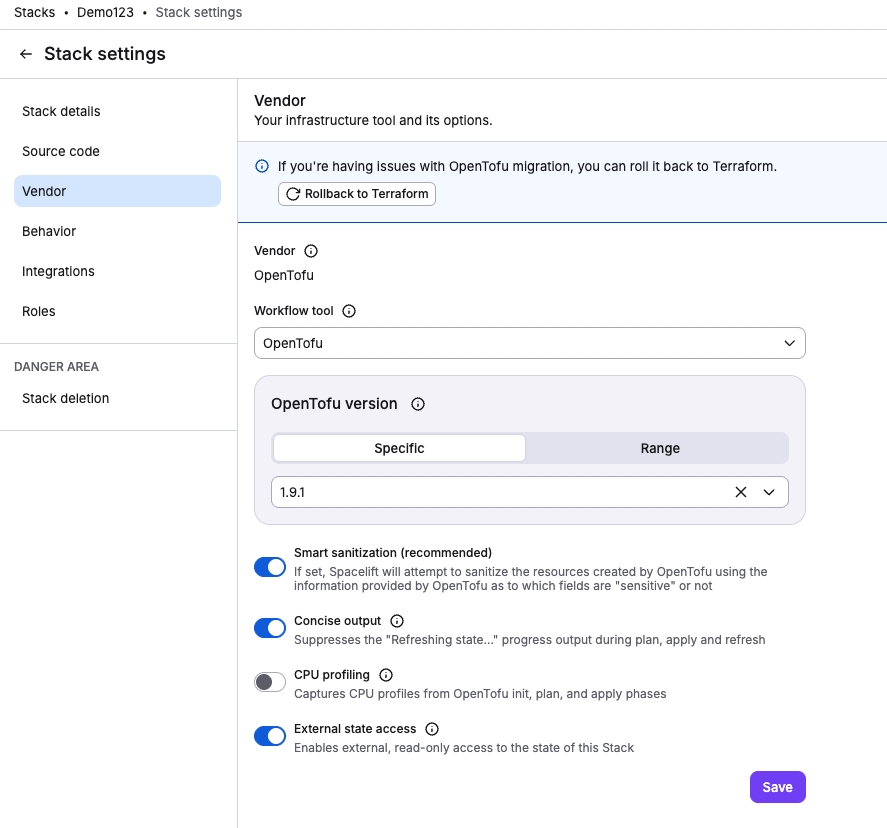
To try the migration on one stack first, or to handle a stack the bulk filters left out, migrate it from the Stack settings > Vendor page. A migration banner appears on eligible stacks.
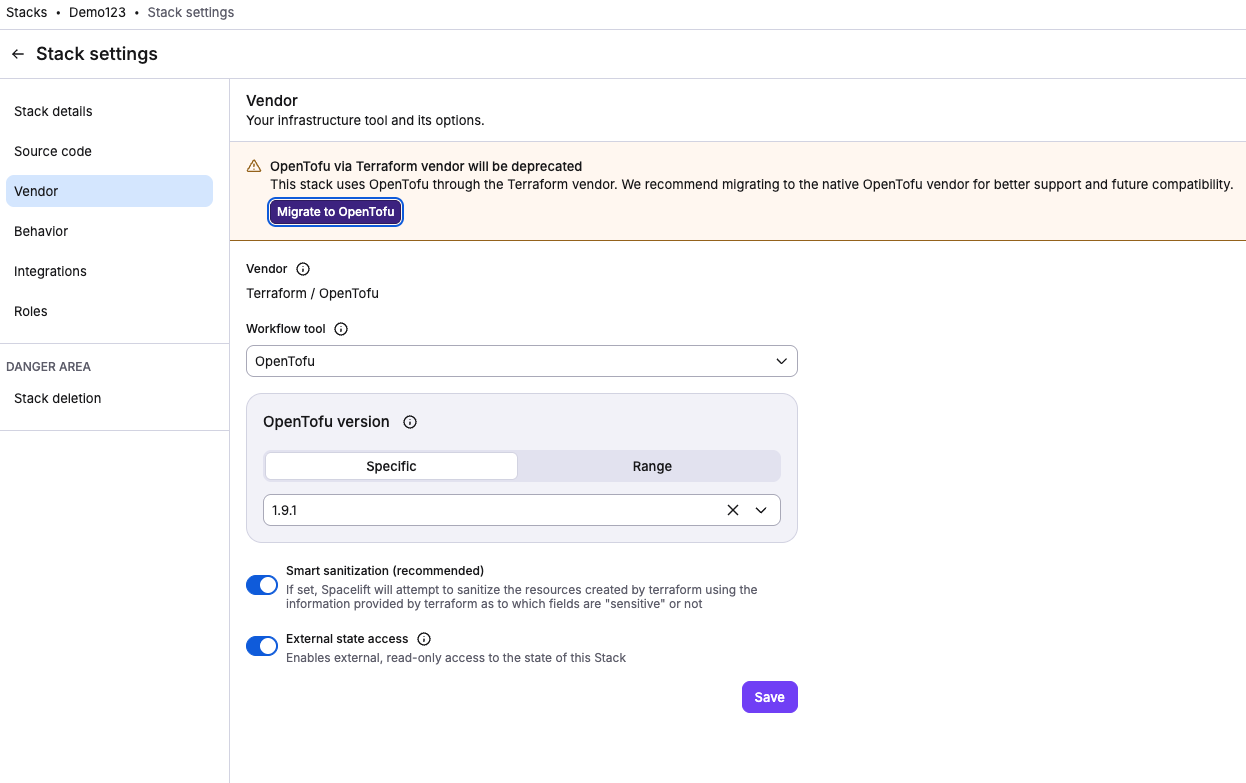
If needed, you can roll back to the previous Terraform-based configuration from the same page.
Updating the Spacelift Terraform Provider configuration»
The opentofu block on spacelift_stack is available from provider v1.53.5. After migrating a stack (from the stack settings or the dashboard), update your spacelift_stack resource to use the opentofu block instead of the top-level Terraform settings with terraform_workflow_tool = "OPEN_TOFU":
1 2 3 4 5 6 7 8 9 10 11 12 | |
The block also accepts workspace, use_smart_sanitization, external_state_access, workflow_tool (OPENTOFU or CUSTOM) and a nested logging { concise = true } block. See the provider documentation for the full reference.
Info
The provider does not expose the CPU profiling setting yet. Manage it in the UI or through the enableCPUProfiling field of vendorConfig.opentofu in the GraphQL API.
Info
For backward compatibility, the Spacelift Terraform Provider maps the new OpenTofu settings to the legacy format when no changes are detected, preventing unnecessary drifts in your plan.
After migration, if your configuration still uses the legacy format, the provider will display a warning during plan:
1 2 3 4 5 6 7 8 9 | |
Update your resource as shown above to resolve this warning.
Updating .spacelift/config.yml»
If the repository pins the version through runtime configuration, replace terraform_version or opentofu_version with an opentofu block for the migrated stacks. On a native OpenTofu stack the legacy keys make every run fail during preparation, including when they come from stack_defaults:
1 2 3 4 5 6 | |
In monorepos that mix Terraform and OpenTofu stacks, keep terraform_version under the individual Terraform stacks rather than in stack_defaults.
Rollback»
Rollback restores the stack to vendor=Terraform with workflow_tool=OPEN_TOFU and copies the version, workspace, Smart Sanitization and external state access settings back. If you roll back a stack and then migrate it to OpenTofu again, Spacelift resets the OpenTofu-specific configuration, such as concise output and CPU profiling, to the defaults. To roll back one stack, use the Stack settings > Vendor page. To roll back stacks in bulk, call the openTofuMigrate mutation with target: Terraform; the UI does not offer bulk rollback. Rollback is available only for stacks that were migrated by this flow.