Test Runs
Each time you run a test scenario, Flows creates a test run. The run executes the flow in an isolated test environment, fires the scenario's triggers, replaces the mocked blocks, and records an outcome for every assertion. This page explains how a run's result is decided, how a run progresses, and what limits apply.
How a run is judged»
A run settles as soon as its result is certain, and its verdict never changes afterwards.
A run fails as soon as any of the following happens:
- An assertion fails, for example an
outputassertion whose expression returns false. - A block fails during the run and no error handler catches the failure. A failure that an error handler catches is treated as part of the flow's design, so it doesn't fail the run. To test an error path, add assertions on the error handler and the blocks after it.
- A trigger can't fire, for example because its body doesn't evaluate to an object.
A run passes once every assertion has passed and the flow has finished. The flow counts as finished when no block has a pending input, no Sleep block is sleeping, no Collect block is waiting out its delay, and no block is waiting on a pending event, such as a Subroutine Call waiting for its result. Any noEvents assertions still pending at that point pass, because nothing is left to reach their blocks.
A run with no assertions fails as soon as it starts, because nothing would judge it.
Timeout»
A run times out after 5 minutes. At the timeout:
- Pending
noEventsassertions pass. - Any other pending assertion fails, because its block was never reached.
- If the flow is still busy, the run fails as timed out.
Deferred work isn't waited for
The run only waits for work that happens inside the flow itself. Work that a block hands off to a later job, such as a Spacelift run group, isn't tracked, so a run can pass before that work finishes. Mock such blocks if their outcome matters to the scenario, or add an output or input assertion on a block that the deferred work reaches. A run doesn't pass while such an assertion is pending, so it waits for the work, up to the timeout.
Run statuses»
stateDiagram-v2
    [*] --> Queued: organization at its run limit
    [*] --> Pending
    Queued --> Pending: a slot frees up
    Pending --> Running: triggers dispatched
    Running --> Passed
    Running --> Failed
    Queued --> Canceled
    Pending --> Canceled
Running --> Canceled| Status | Meaning |
|---|---|
| Queued | Your organization already has the maximum number of active runs. The run starts as soon as another one finishes. |
| Pending | The run is being prepared and the triggers are being dispatched. |
| Running | The triggers have fired and the flow is processing events. |
| Passed | Every assertion passed and the flow finished. |
| Failed | An assertion failed, a block failed without an error handler, or the run timed out. |
| Canceled | Someone canceled the run before it finished. A canceled run has no verdict. |
You can cancel a run that is queued, pending, or running from the scenario's Runs list.
Inspecting results»
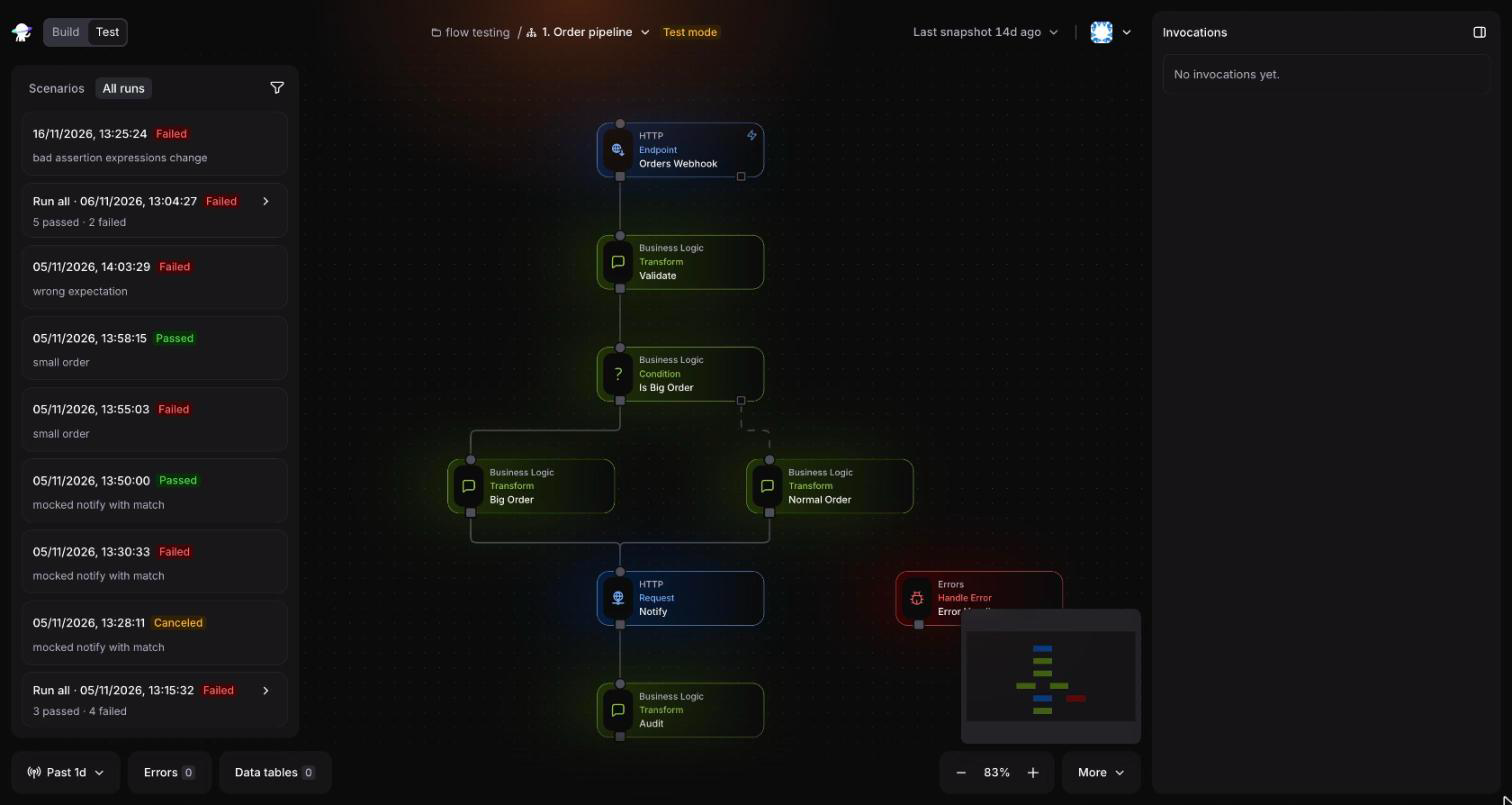
Every scenario in the Test scenarios sidebar shows the status of its last run. Open a scenario and select a run in its Runs list to see:
- The run's status, and an error message if the run itself broke.
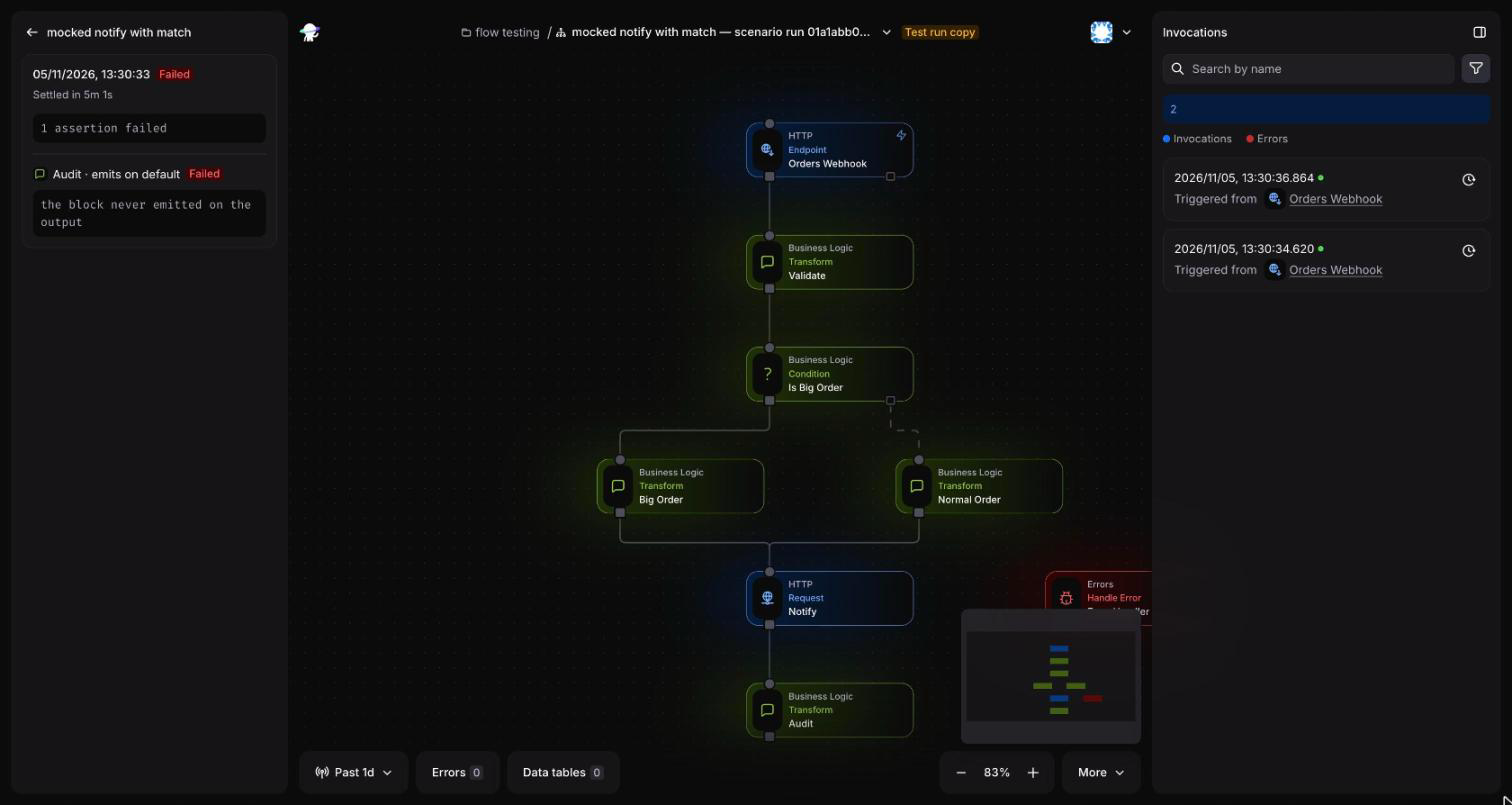
- Each assertion with its outcome, pending, passed, or failed, and a detail explaining a failure. For example:
output assertion on Invite Users to Channel (default): the expression returned false.
From a run, you can open the flow as it ran to see exactly which events each block received and emitted, the same way you would debug a live flow with invocations.
Running several scenarios»
Run all starts every scenario of the flow as one batch. A batch skips scenarios that can't run right now, and is refused only if every scenario would be skipped. A scenario can't be started when:
- It has no triggers.
- It already has a run that is queued, pending, or running.
- One of its triggers or mock emits points at a block or output that no longer exists.
Running scenarios from the command line»
flowctl can run a flow's scenarios and wait for their results, so you can run them in a CI pipeline, for example after applying a flow with the Flows TF Provider.
Preview
The flowctl flow test command is in preview. Enable it by setting the FLOWCTL_ENABLE_TEST_SCENARIOS environment variable to 1.
1 2 3 4 5 6 7 8 9 10 | |
Without --scenario (-s), every scenario of the flow runs as one batch, and scenarios that can't run are reported as skipped. For each scenario that didn't pass, flowctl shows why the run failed and which assertions failed. The command exits with a non-zero status unless every scenario passed, so it can gate a pipeline. Pressing Ctrl-C cancels the runs that are still active. When the command isn't attached to a terminal, --id is required.
flowctl needs the Editor role on the flow's project and the flows:view and test_scenarios:run capabilities. An API key with only the api, flows:view, and test_scenarios:run capabilities is enough. If you logged in before test_scenarios:run was available, run flowctl auth logout and flowctl auth login to get a token with it.
Limits»
| Limit | Value |
|---|---|
| Test scenarios per flow | 100 |
| Active runs per organization | 10 by default. Runs over the limit are queued. |
| Run timeout | 5 minutes |
| Trigger and mock emit delay | Up to 240,000 ms (4 minutes) |
| Run history | 30 days, and at most the 100 newest runs per scenario |
The run queue takes turns between flows, so one flow running all of its scenarios doesn't hold up the others in the organization. Contact Spacelift support if you need a higher limit on active runs.
Runs older than 30 days are deleted automatically, together with their events. Runs beyond the 100 newest per scenario are deleted once they are at least an hour old.
Events and side effects»
Invocations that happen during a test run don't count toward your organization's billable invocations. Events emitted during a test run are still subject to the monthly event limit. Mocked blocks are checked against the limit too, so a mock that loops back into the flow can't emit events without bound.
Test runs don't show up in flow lists, recent flows, dashboards, or analytics. During a run, the flow's HTTP endpoints don't accept requests, its schedules don't fire, and app webhooks don't reach it. However, unmocked blocks still execute for real, so a test run can send messages, call APIs, and change infrastructure just like the live flow. See Mocks.