Test Scenarios
A test scenario is a repeatable check stored with a flow. It describes how to start the flow, which blocks to replace with canned responses, and what you expect to happen. Running a scenario lets you confirm that a flow still behaves correctly after you change it, without waiting for a real webhook, schedule, or incident to exercise it.
Every run happens in an isolated test environment, so the flow you are testing is never touched. Its event history, memory, and configuration stay exactly as they were.
Anatomy of a scenario»
A scenario has a name, which must be unique within the flow, an optional description, and three lists:
- Triggers start the run by sending events into the flow.
- Mocks replace blocks you don't want to execute, such as one that posts to Slack or creates a cloud resource, with outputs you define.
- Assertions describe what must, or must not, happen for the run to pass.
flowchart LR
    T([Trigger]) --> A[HTTP Endpoint]
    A --> B[Transform]
    B --> C["Create Slack channel<br/>(mocked)"]
    C --> D[Invite users]
    D -.- X{{"Assertion:<br/>output.ok === true"}}
Blocks without a mock run live
Only mocked blocks are replaced. Every other block executes for real, including app blocks and HTTP Request blocks that call external systems. Mock any block whose side effects you don't want during a test, such as sending messages, opening tickets, or creating infrastructure.
Triggers»
A trigger sends one event into the flow. A scenario can have several triggers, and each one can be delayed relative to the start of the run.
| Trigger kind | In the UI | What it does |
|---|---|---|
| Event | Deliver an event to an input | Delivers the body to one of a block's inputs, as if an upstream block had emitted it. Use it to start mid-flow. |
| Emit | Emit on an output | Emits the body on one of a block's outputs. This is the only way to start at a source block that has no inputs, such as an HTTP Endpoint or a Schedule. |
The trigger body is a JavaScript expression that must evaluate to an object. It becomes the event data that downstream blocks see.
A test run can't be reached from outside: its HTTP endpoints don't accept requests, its schedules don't fire, and app webhooks don't reach its blocks. Triggers are the only way to start a run.
Mocks»
A mocked block doesn't execute. When an event reaches it, the block emits the events defined by its mock instead. Each of these emits has:
- Output: the output of the mocked block the event is emitted on.
- Body: an expression for the emitted event's data. It can use
inputandevent, so the response can depend on what the block received. - When (optional): a match expression. The emit only fires when it evaluates to true. It can use
inputandevent. Without one, the emit always fires. - Delay (optional): how long to wait after the block is reached, in milliseconds.
A mock can have several emits, for example one per output, or different responses for different inputs. Every emit whose match expression passes fires, so make the match expressions mutually exclusive if you want exactly one response. A mock with no emits makes the block behave as skipped: it receives the event but emits nothing, so the flow ends at that block and no block after it is reached. This is useful for cutting off a branch you are not testing.
A broken emit doesn't fail the run. If the match expression throws an error or returns something other than a boolean, or the body expression throws an error, the emit is skipped and the reason is written to the mocked block's logs. Blocks after it aren't reached through that emit, so any assertion expecting them fails. Check the block's logs when a mock doesn't seem to respond.
Assertions»
An assertion targets one block and checks what happens to it during the run.
| Assertion kind | In the UI | Passes when | Expression can use |
|---|---|---|---|
output |
Emits on an output | The block emits on the chosen output and the expression, if any, is true. | output |
input |
Is reached | The block receives an event and the expression, if any, is true. | input, event |
noEvents |
Receives no events | The block never receives an event, or, if you pick an output, never emits on it. | No expression |
Expressions are written in JavaScript, the same as elsewhere in Flows, and must evaluate to true. For example, output.ok === true or input.channelName.startsWith("incident-").
A scenario needs at least one assertion. A run with no assertions fails immediately. For how assertions combine into a pass or fail, see Test Runs.
Creating a scenario in the UI»
Test scenarios live in the flow's Test mode.
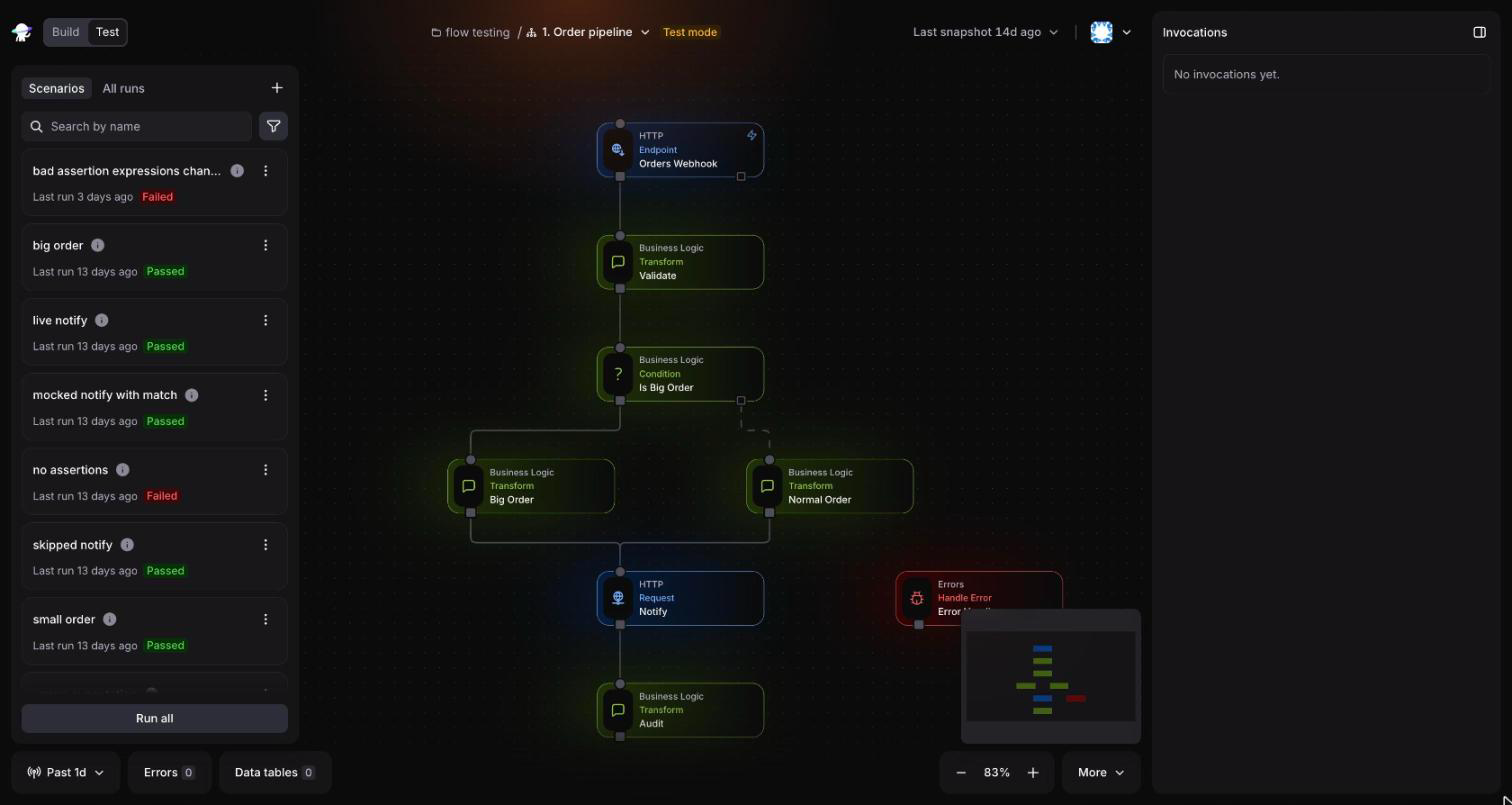
- Open the flow and switch the canvas from Build to Test using the mode switcher.
- In the Test scenarios sidebar, click New scenario, then enter a name and an optional description.
- Under Triggers, click Add trigger. Pick a block, choose how it fires, select the input or output, and enter the event body.
- Under Mocks, click Mock a block and pick the block to replace. Add one or more emits with New emit, or leave it without emits to stop the chain there.
- Under Assertions, click Add assertion. Pick a block and an assertion kind, then enter an expression if the kind takes one.
- Click Run.
The blocks a scenario uses are outlined on the canvas, so you can see at a glance what it triggers, mocks, and checks.
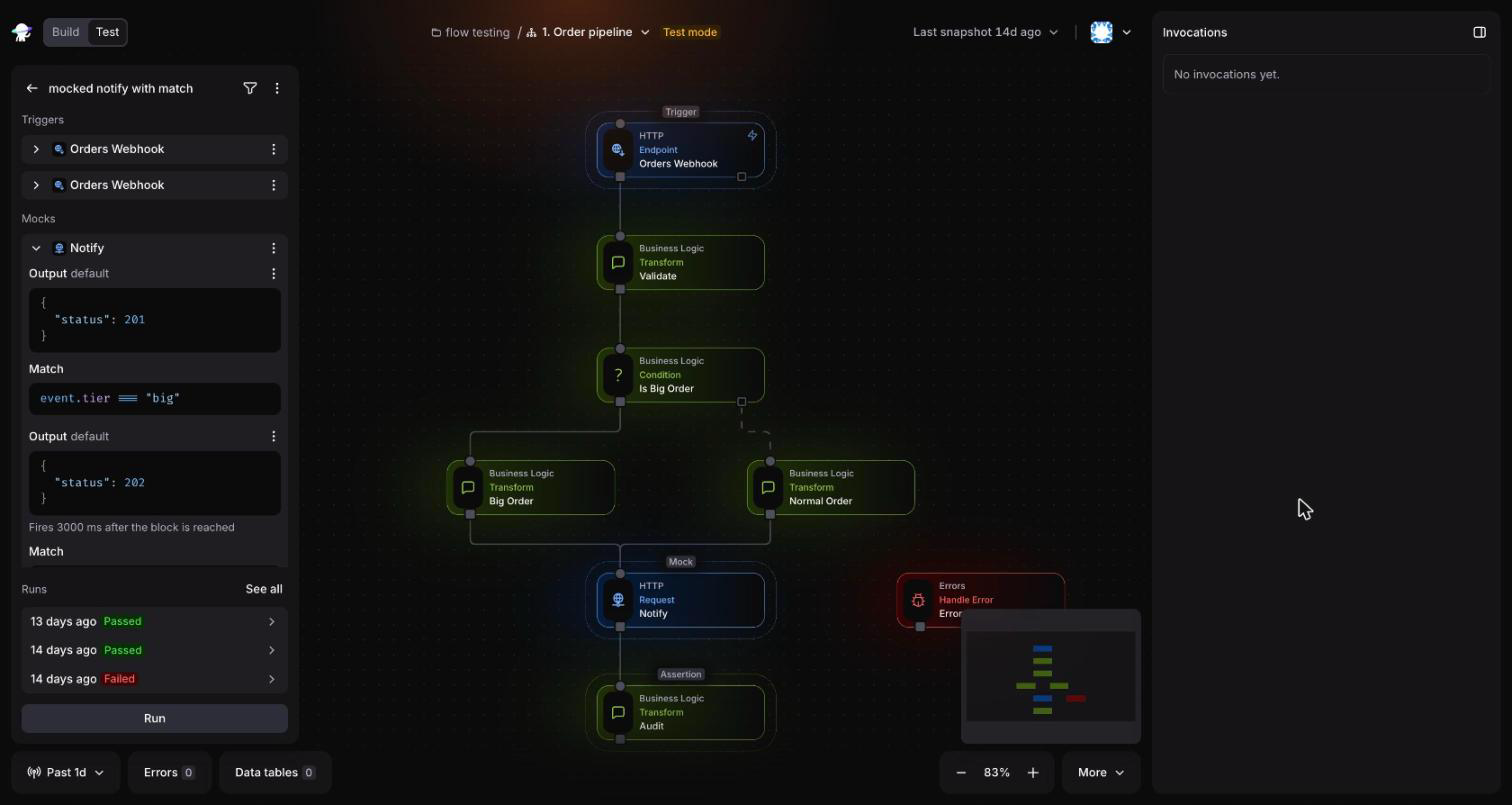
To run every scenario in the flow at once, click Run all in the sidebar. Use the search box and the Last run filter (Passed, Failed, In progress, Never run) to find scenarios in a flow with many of them.
Tip
The Flowy AI assistant can create and edit test scenarios for you. Describe the behavior you want to check, and it adds the triggers, mocks, and assertions to the flow.
Restrictions»
- Group blocks can't be triggered, mocked, or asserted on. Target the blocks inside the group instead.
- A Subroutine Definition can't be mocked. Mock the Subroutine Call block that invokes it instead.
- Trigger and emit delays must be between 0 and 240,000 milliseconds (4 minutes), so that the run has time to react before it times out.
- A flow can have at most 100 test scenarios.
When you delete or rename a block or output, triggers and mock emits that still point at it prevent the scenario from running until you update them.
Defining scenarios in YAML»
When you manage flows as code with the Flows TF Provider, test scenarios are part of the flow definition, under a top-level testScenarios key. Blocks are referred to by name.
| flow.yaml | |
|---|---|
1 2 3 4 5 6 7 8 9 10 11 12 13 14 15 16 17 18 19 20 21 22 23 24 25 26 27 28 29 30 31 32 | |
- An
emittrigger: settingoutputemits the body on that output, which starts the run at a source block. - An
eventtrigger: settinginputdelivers the body to that input, one second after the run starts. - Every emit whose
matchexpression passes fires. Here the first emit only fires for channels namedincident-42…, while the second, which has nomatch, always fires 500 milliseconds after the block is reached. - A mock with no emits stops the chain at this block.
TestScenario»
| Property | Type | Description |
|---|---|---|
name |
String | Name of the scenario. Unique within the flow. |
description |
String | Optional description of what the scenario tests. |
triggers |
Array of TestScenarioTrigger | Events that start a run of the scenario. |
mocks |
Map of block name to Array of TestScenarioMockEmit | Blocks that don't execute in runs, with what they emit instead. A mock without emits stops the chain. |
assertions |
Array of TestScenarioAssertion | What a run is expected to do. |
TestScenarioTrigger»
| Property | Type | Description |
|---|---|---|
block |
String | Name of the block the trigger targets. |
input |
String | Input key the body is delivered to. Set exactly one of input and output. |
output |
String | Output key the body is emitted on. Use it to start at a block without inputs. |
body |
Expression | The event body. Must evaluate to an object. |
delayMs |
Integer | Delay from the start of the run, in milliseconds. |
TestScenarioMockEmit»
| Property | Type | Description |
|---|---|---|
output |
String | Output key of the mocked block the event is emitted on. |
match |
Expression | The emit only fires when this is true. Sees input and event. Always fires when unset. |
body |
Expression | The emitted body. Sees input and event. |
delayMs |
Integer | Delay from the mocked block being reached, in milliseconds. |
TestScenarioAssertion»
| Property | Type | Description |
|---|---|---|
block |
String | Name of the block the assertion is about. |
kind |
String | One of output, input, or noEvents. |
output |
String | Output key. Required for output, optional for noEvents. |
expr |
Expression | Must be true. Sees output for output assertions, and input and event for input assertions. Not allowed for noEvents. |
When you apply a definition:
- If it has no
testScenarioskey, the flow's existing scenarios are left as they are. This lets you keep scenarios managed in the UI while managing blocks as code. - If it has a
testScenarioskey, it becomes the full list. Scenarios not in the list are deleted. - Scenarios are matched by name, ignoring case. Renaming a scenario in YAML deletes it and creates a new one, which loses its run history.
Duplicating a flow copies its test scenarios along with its blocks.
Permissions»
Anyone with the Viewer role on the flow's project can see its test scenarios and their runs. Creating, editing, deleting, running, and canceling scenarios requires the Editor role. See Managing Permissions.
API keys and OAuth2 authorizations also need the test_scenarios:run capability to start or cancel runs.