Subroutine Blocks
Subroutine blocks are business logic blocks for reusing logic, allowing flows to run the same sequence of blocks from several places instead of duplicating it.
They're also the recommended way to reduce a flow's size and complexity. A large flow can be split into subroutines, so that each part is replaced by a single Subroutine Call, and the subroutines can be moved to other flows.
A call runs in four steps:
- An event reaches the Subroutine Call's input.
- The Subroutine Definition emits the values passed by the call on its output, and the subroutine's body runs. The body is made of ordinary blocks, so anything a flow can do works there.
- The body sends an event into one of the Subroutine Definition's inputs, which ends the subroutine.
- The Subroutine Call emits that event on its corresponding output, and the flow continues from the Call.
Subroutine Definition Block»
Marks the start of a subroutine and receives its result. The blocks linked to its output form the subroutine's body, which returns its result by looping back to the definition's inputs.
Subroutine Call Block»
Runs a subroutine and waits for its result. The Subroutine Definition to run is selected in the block's configuration.
Example: Slack Approval»
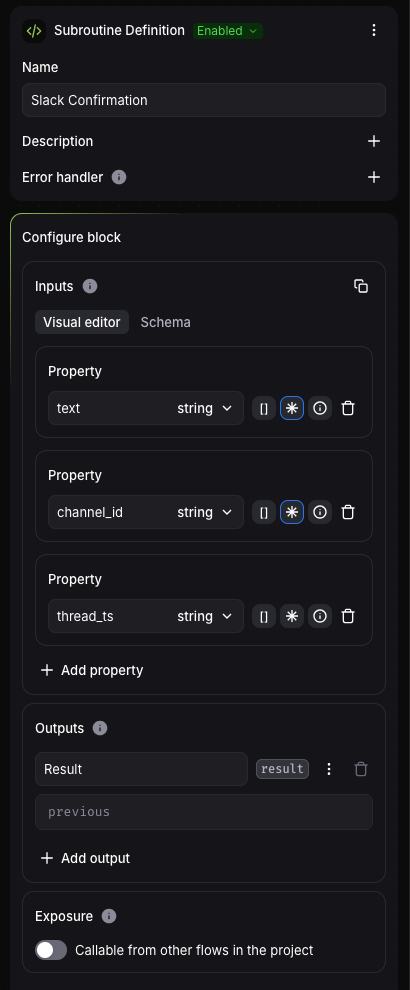
Slack Confirmation (Subroutine Definition) posts a message with Approve and Decline buttons, waits for a click, and checks which button was clicked:
- Approval links both of its outputs back into Slack Confirmation, so the
call returns
{ result: true }or{ result: false }. - Mark approved and Mark rejected update the message to show who answered. They run on every call, but they don't feed the result.
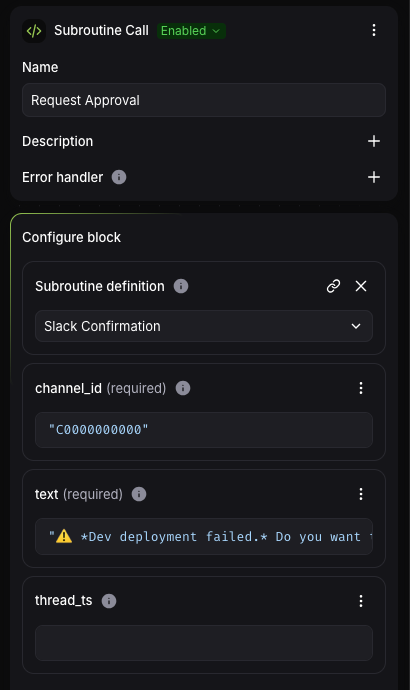
Request Approval (Subroutine Call) passes the message text and the channel,
and emits the answer. Blocks after it read it from
outputs.requestApproval.result. Inputs covers how Slack
Confirmation declares the values it takes.
Inputs»
The Subroutine Definition holds a schema of the inputs the subroutine takes, and every Subroutine Call that runs it shows a parameter for each one.
The subroutine's blocks read the parameters as outputs.<definition>.<input>.
They're all the subroutine gets from its caller: its blocks can't read the
outputs of the blocks before the Subroutine Call.
Returning a Value»
By default, the Subroutine Call emits the output of the block linked back into the Subroutine Definition. To return something else, give the output a value expression. It's evaluated when the result arrives, so it can read the outputs of any block in the subroutine, and the Subroutine Call's output takes its type.
In the example, Approval returns as soon as the user clicks, before the message is updated. Linking the Mark blocks back into Slack Confirmation instead makes the call wait for the update, and a value keeps returning the answer rather than Slack's updated message:
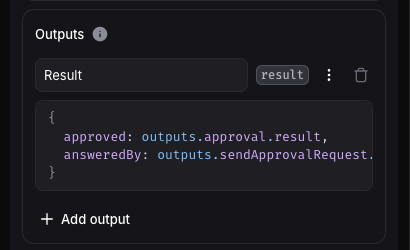
Request Approval now emits { approved: true, answeredBy: "U0123ABC" }, and the
blocks after it read outputs.requestApproval.approved.
Output Channels»
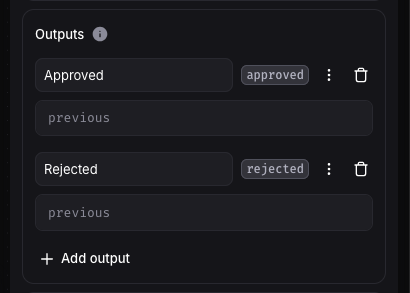
A subroutine can return on several outputs, for example one per outcome. Each output added to the Subroutine Definition is an input on it, where the subroutine links the block that ends that outcome, and an output on every Subroutine Call that runs it. The call returns on whichever output is reached first, and each output can have its own value.
The example can be updated so Approved and Rejected outputs replace the value: Mark approved links into Approved and Mark rejected into Rejected. The blocks after Request Approval follow each outcome from its own output, without checking a value:
Outputs can also implement other patterns, such as custom timeouts or error handling.
Timeouts»
A Subroutine Call waits up to 14 days for a result. After that, the call is cancelled and reported to the Call's error handler. To give up sooner, add an output the subroutine reaches after a delay, for example through a Sleep block linked from the Subroutine Definition. A result sent after the call has returned is dropped, with a warning in the Subroutine Definition's logs.
Errors»
When a block in the subroutine fails, no result reaches the Subroutine
Definition, and the call waits until it times out. To return the error instead,
give the subroutine's blocks a Handle Error block of their own and link it into
an output, such as Failed. The Subroutine Call then emits the error event, with
the message in error.message. Errors in the Subroutine Call itself, such as
invalid parameters, go to the Call's own error handler.
Calling Across Flows»
By default, a Subroutine Definition can only be called from its own flow. Turning on its Exposure setting lets Subroutine Calls in the project's other flows select it as well. The Call's picker lists the Definitions of its own flow first, then the exposed ones, grouped by flow.
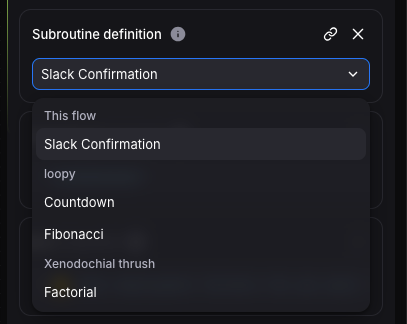
To navigate from Call to Definition, the link button next to the Call's selected Definition can be used. In the other direction, the Subroutine Definition's Callers tab lists every Subroutine Call that runs it, with its flow, and opens the selected one. Exposure can't be turned off while Calls in other flows use the Definition: re-point or remove them first, from the Callers tab.